
Can you self-clean a KitchenAid oven? Yes, you can self-clean a KitchenAid oven using its built-in self-cleaning cycle. This guide will walk you through the entire process, from preparing your oven to completing the clean.
A sparkling clean oven can make your kitchen feel brand new. If you own a KitchenAid oven, you’re likely familiar with its convenient self-cleaning feature. This function uses high heat to turn food residue into ash, making it easy to wipe away. But how do you use it correctly? This comprehensive guide will cover everything you need to know about KitchenAid oven cleaning using the self-clean cycle. We’ll also touch on alternative methods for deep clean KitchenAid oven tasks.
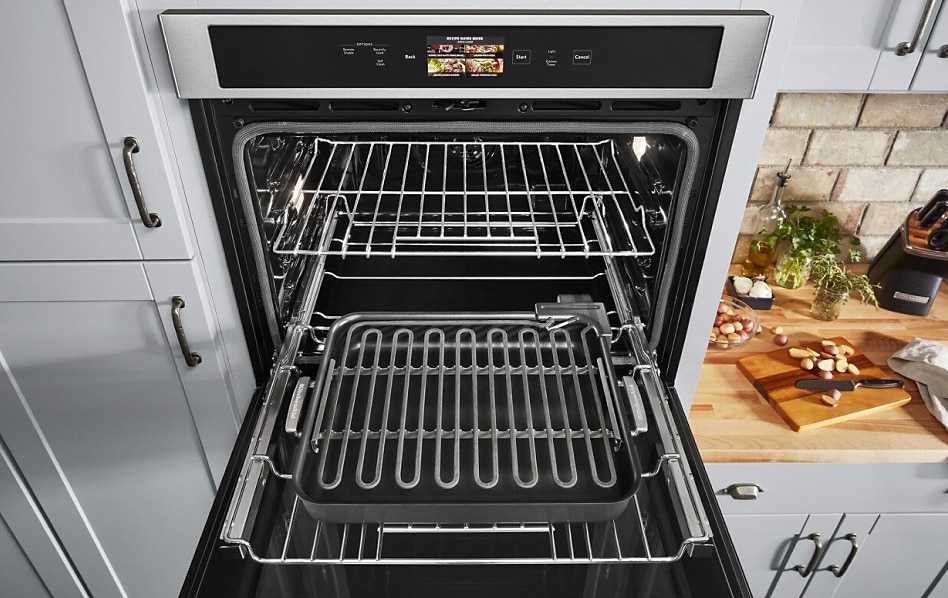
Image Source: www.kitchenaid.com
Preparing Your KitchenAid Oven for the Self-Clean Cycle
Before you initiate the oven cleaning cycle, it’s crucial to prepare your oven properly. This ensures safety and optimal cleaning results. Following these steps will help you avoid potential issues and get the best out of your self-cleaning oven instructions.
1. Remove Oven Racks, Broiler Pan, and Accessories
This is a non-negotiable first step. Oven racks, broiler pans, and any other removable accessories are not designed to withstand the extreme temperatures of the self-clean cycle. High heat can warp, discolor, or damage their surfaces.
- Why remove them? The self-cleaning cycle heats the oven to temperatures between 800°F and 1000°F (427°C to 538°C). At these temperatures, metal components like oven racks can oxidize, lose their protective coatings, and become brittle. The shiny chrome finish on many racks can turn dull or even brown.
- What to do with them?
- Wash them manually: This is the best approach. Use warm, soapy water and a non-abrasive scrubber. For stubborn baked-on food, you can soak them in hot water with a bit of dish soap.
- Consider alternative cleaning methods: If you’re looking for a deep clean KitchenAid oven for your racks, you might consider a baking soda oven cleaning paste or a soak with oven cleaner (ensure it’s safe for your rack material).
- Store them safely: Keep them in a clean, dry place while the oven is self-cleaning.
2. Wipe Away Loose Debris
While the self-clean cycle burns off residue, very large food particles or spills can create excessive smoke or even flames. It’s wise to do a quick preliminary wipe-down to remove these larger bits.
- What to look for: Large pieces of burnt food, spills, or grease that haven’t been fully baked on.
- How to do it: Use a damp cloth or paper towel to gently wipe out any loose debris from the oven floor and walls. Don’t scrub hard; just aim to remove anything that might easily fall off. This step helps minimize smoke during the cycle.
3. Check and Clean the Oven Door Seal
The oven door seal is designed to keep the heat inside the oven during normal cooking and the self-clean cycle. It’s usually made of a heat-resistant material. However, it’s important to ensure it’s free from obstructions that could prevent a proper seal.
- Inspect for damage: Look for any tears or missing sections in the seal. If it’s damaged, the self-clean cycle might not be as effective, and you may need to consider professional repair.
- Gentle cleaning: If the seal has some grime on it, you can wipe it gently with a damp cloth. Avoid using harsh cleaners or abrasive materials, as these can damage the seal.
4. Ensure Proper Oven Ventilation
Self-cleaning ovens produce fumes as they burn off food residue. It’s essential to ensure your kitchen is well-ventilated to dissipate these fumes.
- Open windows: Open windows in your kitchen or nearby rooms to allow fresh air to circulate.
- Use exhaust fans: Turn on your range hood or any other kitchen exhaust fans.
- Keep pets away: Certain fumes released during the self-clean cycle can be harmful to birds and small animals. It’s best to keep them out of the kitchen or even the house during the oven cleaning cycle.
5. Secure the Oven Door
Most KitchenAid ovens will automatically lock the door when the self-clean cycle begins and will not unlock until the oven has cooled down to a safe temperature. Ensure the door is properly closed before starting.
- Door lock mechanism: Familiarize yourself with how your specific KitchenAid oven’s door lock operates. Refer to your Kitchenaid manual oven clean section for details.
- Do not force the door: Never try to force the oven door open during the self-cleaning cycle. The locking mechanism is a safety feature.
How to Use the Self-Clean Cycle on Your KitchenAid Oven
Now that your oven is prepped, it’s time to initiate the self-cleaning process. Here’s how to use the self-clean function, step-by-step, so you can confidently follow your self-cleaning oven instructions.
Initiating the Self-Clean Cycle
The exact process might vary slightly depending on your specific KitchenAid oven model, so always refer to your owner’s manual. However, the general steps are consistent.
1. Select the Self-Clean Option
Locate the self-clean button or setting on your oven’s control panel. This is usually clearly labeled.
2. Choose the Cycle Length (If Applicable)
Some KitchenAid models allow you to select the duration of the self-clean cycle. Common options include:
- 3-Hour Cycle: Suitable for ovens with light to moderate soil.
- 4-Hour Cycle: Recommended for ovens with heavier buildup.
- “Max” or “Heavy Duty” Cycle: For ovens that haven’t been cleaned in a while and have significant removing oven grime.
Choosing the right cycle length can optimize the cleaning process and energy usage.
3. Start the Cycle
Once you’ve made your selection, press the “Start” or equivalent button. The oven door will automatically lock shortly after the cycle begins.
- Confirmation: Many ovens will display a light or message indicating that the self-clean cycle is active and the door is locked.
During the Self-Clean Cycle
While the self-clean cycle is running, there are a few things to keep in mind.
1. Expect Some Odor and Smoke
It’s normal for the oven to produce some smoke and odor as it burns off food residue. This is a sign the cleaning is working.
- Ventilation is Key: This reinforces the importance of good ventilation. If you notice excessive smoke or a strong burning smell that seems abnormal, stop the cycle and ensure proper ventilation.
2. The Oven Will Not Work
During the self-clean cycle, the oven controls will be locked, and the oven will not heat up for cooking.
3. Monitor the Process (Visually, from a Safe Distance)
While you don’t need to hover over the oven, it’s good practice to be aware that the cycle is running.
After the Self-Clean Cycle Completes
Once the oven cleaning cycle is finished, the oven needs time to cool down.
1. Cooling Down
The oven will remain locked for a period as it cools to a safe temperature. This can take an hour or more, depending on the cycle length and ambient room temperature.
- Patience is a virtue: Resist the urge to try and open the door prematurely. The lock is a safety feature to prevent burns.
2. Unlocking the Door
The oven door will automatically unlock once the internal temperature has dropped to a safe level.
3. Wiping Away Ash
After the door unlocks and the oven has cooled completely, you’ll find a fine gray ash residue on the oven walls and floor.
- Use a damp cloth: Wipe out this ash with a damp cloth or sponge. For any stubborn ash, a non-abrasive cleaner can be used.
- Rinse and repeat: You may need to rinse your cloth several times to remove all the ash.
Dealing with Stubborn Grime: When Self-Clean Isn’t Enough
While the self-clean cycle is highly effective for routine cleaning, some ovens, especially those with significant build-up, might require a little extra help. Here’s how to tackle tougher jobs and explore alternatives for a truly deep clean KitchenAid oven.
Alternative Cleaning Methods for Removing Oven Grime
If the self-clean cycle didn’t quite get everything, or if you prefer to avoid the high heat, here are some effective alternatives.
Baking Soda Oven Cleaning
Baking soda is a natural abrasive and deodorizer, making it an excellent choice for cleaning ovens.
- Create a paste: Mix baking soda with a small amount of water to form a thick paste.
- Apply the paste: Spread the paste all over the interior surfaces of the oven, avoiding the heating elements. Pay special attention to areas with heavy removing oven grime.
- Let it sit: Leave the paste on for at least a few hours, or preferably overnight.
- Scrub and wipe: Use a damp cloth or sponge to scrub away the dried paste and the loosened grime. For tougher spots, a plastic scraper or nylon brush can be helpful.
- Rinse thoroughly: Wipe down the oven with a clean, damp cloth multiple times to remove all baking soda residue.
Vinegar Oven Cleaning
Vinegar’s acidity helps to break down grease and grime. It’s often used in conjunction with baking soda.
- Vinegar spray: Fill a spray bottle with white vinegar.
- After baking soda: After you’ve removed the baking soda paste and any remaining grime, spray the oven interior with vinegar. The vinegar will react with any leftover baking soda, creating a fizzing action that can help lift stubborn spots.
- Wipe clean: Wipe down with a clean cloth.
Commercial Oven Cleaners (Use with Caution)
There are many commercial oven cleaners available. If you choose to use one, always follow the product’s instructions carefully and ensure it’s safe for your specific KitchenAid oven model.
- Safety first: Always wear rubber gloves and ensure good ventilation.
- Avoid sensitive parts: Do not spray oven cleaner on oven door seals, heating elements, light bulbs, or the oven door gasket.
- Rinse thoroughly: It’s crucial to rinse the oven thoroughly after using chemical cleaners to remove any residual fumes or chemicals that could affect your food.
Cleaning the Oven Racks Manually
As mentioned earlier, it’s best to clean oven racks separately.
- Soaking method: Fill a bathtub (protect it with old towels) or a large plastic tub with hot water and a generous amount of dish soap. Submerge the racks and let them soak for several hours or overnight. Then, scrub with a non-abrasive pad.
- Baking soda and vinegar soak: For tough grease, you can add baking soda and vinegar to the hot water soak for added cleaning power.
Important Safety Considerations for KitchenAid Oven Cleaning
Safe oven cleaning is paramount. The self-cleaning cycle involves extreme heat, so taking precautions is essential.
1. Never Leave the House During Self-Clean
While the cycle is designed to be safe, it’s always best to be home when the self-cleaning cycle is running, just in case. This allows you to address any unexpected issues promptly.
2. Keep Children and Pets Away
As mentioned earlier, the fumes can be harmful to pets, especially birds. Keep children and pets out of the kitchen during the cycle and while the oven is cooling down.
3. Ensure Proper Ventilation
This cannot be stressed enough. Good ventilation helps dissipate fumes and keeps your home environment healthy.
4. Do Not Use Oven Cleaners on the Self-Clean Mechanism
Never spray chemical oven cleaners inside the oven cavity when preparing for or during a self-clean cycle. This can damage the oven’s components and the self-clean system.
5. Inspect the Oven Before Each Use
After cleaning, it’s a good habit to visually inspect your oven to ensure all cleaning agents have been removed and there are no residual odors or residue before cooking food.
When to Consult Your KitchenAid Manual Oven Clean Section
Your Kitchenaid manual oven clean section is your most valuable resource. It contains specific information tailored to your model, including:
- Detailed instructions for operating the self-clean cycle.
- Information on recommended cleaning intervals.
- Troubleshooting tips for common issues.
- Guidance on cleaning specific oven components.
- Warnings about what not to do.
If you’re unsure about any step or encounter an issue, always refer to your manual first. If you no longer have your manual, you can usually find a digital copy on the KitchenAid website by entering your oven’s model number.
Frequently Asked Questions About KitchenAid Oven Cleaning
Here are answers to common questions people have about cleaning their KitchenAid ovens.
Q1: How often should I use the self-clean cycle on my KitchenAid oven?
A1: The frequency depends on how often you use your oven and how messy it gets. For most households, running the self-clean cycle once or twice a year is sufficient. If you bake frequently or notice a significant build-up of grease and food spills, you might need to use it more often. Avoid using it after every use, as excessive use can put stress on oven components.
Q2: Can I clean the oven racks during the self-clean cycle?
A2: No, you should never leave oven racks inside the oven during a self-clean cycle. The extreme heat can damage their finish and even warp them. Always remove oven racks before starting the cycle.
Q3: What if my KitchenAid oven produces excessive smoke during self-cleaning?
A3: Some smoke and odor are normal. However, excessive smoke could indicate that there are large food particles or grease build-up that needs to be manually cleaned before running the cycle. Ensure you’ve removed loose debris and that the oven door seal is intact. If the problem persists, consult your Kitchenaid manual or contact customer support.
Q4: Can I use oven cleaner sprays inside my KitchenAid oven if I’m not using the self-clean cycle?
A4: Yes, you can use commercial oven cleaners for a deep clean KitchenAid oven if you prefer not to use the self-clean cycle. However, always follow the product’s instructions meticulously and ensure it’s safe for your specific oven model. Always rinse the oven thoroughly to remove any chemical residue before cooking.
Q5: My KitchenAid oven door is locked after the self-clean cycle. What should I do?
A5: The oven door is designed to lock automatically during the self-clean cycle for safety. It will remain locked until the oven has cooled down to a safe temperature. This can take an hour or more. Do not attempt to force the door open. It will unlock on its own when it’s safe. If the door remains locked for an extended period (several hours) after the oven has cooled, refer to your Kitchenaid manual oven clean section or contact customer support.
Q6: Is it safe to use baking soda and vinegar to clean my KitchenAid oven?
A6: Yes, using baking soda and vinegar is a safe and effective way to clean your KitchenAid oven, especially for removing oven grime that the self-clean cycle might miss or if you prefer a more natural approach. These methods are generally considered safe oven cleaning practices.
By following these detailed steps and safety precautions, you can confidently use the self-cleaning feature of your KitchenAid oven to keep it looking its best and functioning optimally. Remember that regular maintenance and understanding how to use self clean oven functions will extend the life of your appliance and ensure a cleaner, safer cooking environment.