
Image Source: i.ytimg.com
KitchenAid Dishwasher Locked? How To Unlock KitchenAid Dishwasher
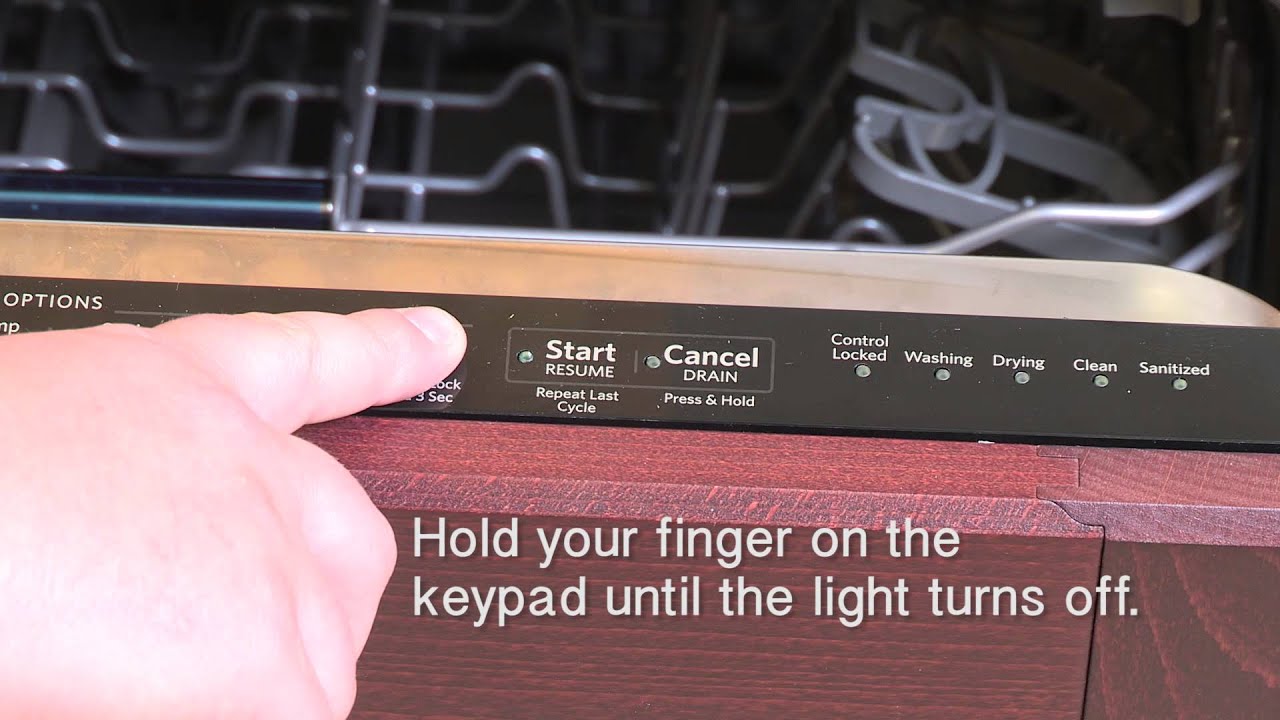
Is your KitchenAid dishwasher locked and refusing to start or open? Most KitchenAid dishwashers can be unlocked by pressing and holding specific buttons on the control panel for a few seconds. The exact combination depends on your model, but it’s commonly the “Control Lock” or “Child Lock” button, often found in conjunction with “Start” or another main function button.
A locked KitchenAid dishwasher can be frustrating, especially when you have a load waiting. Whether it’s the KitchenAid dishwasher control panel lock that’s accidentally activated, a KitchenAid dishwasher keypad locked situation, or a more general KitchenAid dishwasher won’t start issue, there are usually straightforward solutions. This guide will help you navigate common locking mechanisms and provide troubleshooting steps for various KitchenAid dishwasher problems.
Deciphering Common Locking Scenarios
KitchenAid dishwashers often feature a control lock or child lock function. This is designed to prevent accidental changes to the cycle or to stop children from starting or stopping the dishwasher. However, it can sometimes be activated unintentionally, leaving you wondering why your dishwasher is unresponsive.
The Control Lock Feature
Many KitchenAid models have a dedicated “Control Lock” button or a combination of buttons that activate this feature. When engaged, the control panel will typically show an indicator light or a symbol (often a lock icon) to show it’s active. This prevents any buttons from being pressed until the lock is deactivated.
- Purpose: Prevents unintended operation.
- Activation: Usually a long press of a specific button.
- Deactivation: Usually a long press of the same button or button combination.
The Child Lock Feature
Similar to the control lock, the child lock is primarily for safety. It disables the entire control panel, ensuring that a cycle cannot be interrupted or started by curious little hands. Again, this can be activated accidentally.
- Purpose: Child safety.
- Activation: Often requires holding a button for 3-5 seconds.
- Deactivation: Requires the same action to unlock.
Common Reasons for a Locked KitchenAid Dishwasher
Several factors can lead to your KitchenAid dishwasher appearing locked or unresponsive:
- Accidental Activation of Control Lock/Child Lock: This is the most frequent cause. A stray bump or a prolonged press of a button can activate the lock.
- Power Interruption During a Cycle: If there’s a power surge or outage while the dishwasher is running, it might enter a locked state upon restarting.
- Control Panel Malfunction: Less commonly, a faulty component on the control panel itself can cause it to behave as if it’s locked.
- Door Latch Issues: A door that isn’t fully latched might prevent the dishwasher from starting, sometimes leading to a perceived “locked” state.
- Specific KitchenAid Dishwasher Error Codes: Some KitchenAid dishwasher error codes might indicate a control system issue that mimics a locked state.
How to Unlock Your KitchenAid Dishwasher: Step-by-Step
The primary method to unlock your KitchenAid dishwasher involves deactivating the control lock or child lock feature. Always refer to your specific KitchenAid dishwasher manual for precise instructions, as button layouts and activation sequences can vary between models.
Method 1: Deactivating the Control Lock/Child Lock
This is the most common and effective method.
Step 1: Identify the Control Lock Button
- Look for a button labeled “Control Lock,” “Child Lock,” or sometimes indicated by a lock icon ( ).
- If there isn’t a dedicated button, check your manual for a button combination. Common combinations include:
- Holding the “Start” button for 3-5 seconds.
- Holding “Heat Dry” and “Normal Wash” buttons simultaneously for 3-5 seconds.
- Holding “Options” and “Start” for 3-5 seconds.
Step 2: Press and Hold the Designated Button(s)
- Once identified, press and hold the correct button or combination of buttons.
- Keep holding them for the duration specified in your manual, typically 3 to 5 seconds.
Step 3: Check for Confirmation
- Listen for a beep or look for the lock indicator light to turn off.
- The control panel should become responsive, allowing you to select cycles and start the dishwasher.
What if the control panel shows a lock symbol? This is a clear indication the control lock feature is active. The method described above is the direct solution.
Method 2: Resetting the KitchenAid Dishwasher
If the control lock isn’t the issue, or if you’re experiencing a general KitchenAid dishwasher won’t start problem, a reset might help. This essentially restarts the dishwasher’s computer system.
Step 1: Locate the Reset Button (if applicable)
- Some models have a visible KitchenAid dishwasher reset button, often located near the main control panel or sometimes on the side of the unit. Consult your KitchenAid dishwasher manual.
- If no dedicated reset button is present, the reset is usually achieved by interrupting the power supply.
Step 2: Reset by Interrupting Power
- Turn off the dishwasher: Use the power button on the control panel if it’s responsive.
- Unplug the dishwasher: Go to the electrical outlet and unplug the dishwasher. If it’s hardwired, turn off the corresponding circuit breaker in your home’s electrical panel.
- Wait: Leave the dishwasher without power for at least 5-10 minutes. This allows any residual charge to dissipate and the internal electronics to reset.
- Restore Power: Plug the dishwasher back in or turn the circuit breaker back on.
- Test: Try to operate the dishwasher normally.
When would you use a reset? A reset is a good general KitchenAid dishwasher troubleshooting step for any unusual behavior, including the KitchenAid dishwasher display locked or a complete lack of response.
Method 3: Addressing a Locked Door
Sometimes, the dishwasher might appear locked because the door isn’t opening properly.
- Ensure the cycle is complete: The door lock mechanism typically disengages automatically once a cycle finishes. If the dishwasher is mid-cycle or has been interrupted, it might remain locked.
- Wait after cycle completion: Give the dishwasher a few minutes after the cycle finishes to allow the lock to disengage.
- Check for obstructions: Ensure nothing is blocking the door latch or the door itself from opening.
- Manual Release (Rare): Some older models might have a manual release, but this is uncommon in modern KitchenAid dishwashers. Consult your manual.
- If the door won’t open and the dishwasher is cold: It’s possible the latch mechanism has failed. This might require professional service.
Troubleshooting Other “Locked” Symptoms
If your KitchenAid dishwasher isn’t just locked but also exhibiting other issues, consider these troubleshooting steps:
KitchenAid Dishwasher Won’t Start
This could be related to a lock, but also other factors:
- Power: Is the unit plugged in? Is the circuit breaker tripped?
- Door Latch: Is the door firmly closed and latched? The dishwasher won’t start if the door sensor isn’t engaged.
- Water Supply: Is the water supply valve open? Is the water line kinked?
- Control Lock: As discussed, ensure the control lock isn’t active.
- Delay Start: Is the “Delay Start” feature accidentally activated? Check the KitchenAid dishwasher display locked or for a delay timer on the panel.
KitchenAid Dishwasher Display Locked
If only the display seems locked, it’s almost certainly the control lock or child lock feature. The methods outlined in “Method 1” are your primary solution. If the display remains locked after attempting the deactivation, consider a power reset as described in “Method 2.”
KitchenAid Dishwasher Door Won’t Open
This is a specific symptom that can feel like a lock.
- Cycle Status: Has the cycle fully completed?
- Cooling Period: Dishwashers often keep the door locked for a short period after drying to prevent steam from escaping.
- Latch Mechanism: The door latch assembly might be faulty. If the dishwasher is powered off and the door still won’t budge, and you’ve confirmed no cycle is in progress, a mechanical failure is likely.
Interpreting KitchenAid Dishwasher Error Codes
Sometimes, the dishwasher might display error codes that hint at why it’s behaving oddly, which can include a locked state.
| Error Code | Description | Possible Cause | Solution |
|---|---|---|---|
| F1 E0 | Water sensor failure | Faulty water sensor or wiring | Reset the dishwasher. If the error persists, call for service. |
| F2 E1 | Water inlet valve issue | Blocked inlet valve, low water pressure | Check water supply. Ensure valve is open. Reset the unit. |
| F3 E0 | Drain system issue | Clogged drain hose or pump | Clean the drain filter and hose. Ensure no kinks. Run a drain-only cycle. |
| F3 E1 | Drain pump motor failure | Malfunctioning drain pump | Reset the dishwasher. If the error code returns, the pump may need replacement. |
| F4 E0 | Rinse aid dispenser issue | Dispenser malfunction | Ensure dispenser is clean and filled. Reset the dishwasher. |
| F5 E0 | Overfill protection activated | Float switch issue or water valve stuck open | Turn off water supply immediately. Reset the dishwasher. If it overfills again, call for service. |
| F7 E1 | Inlet valve open when it should be closed | Faulty inlet valve | Turn off water supply. Reset the dishwasher. If issue persists, service is needed. |
| F8 E0 | High water temperature detected | Faulty temperature sensor or heating element | Reset the dishwasher. If the error persists, it could be a sensor or heating element problem. |
| F9 E0 | Door latch failure | Loose or damaged door latch | Ensure the door is properly closed. Check the latch mechanism for obstructions. Reset the dishwasher. If it persists, service may be needed. |
These are just a few examples, and your specific KitchenAid dishwasher error codes might differ. Always consult your KitchenAid dishwasher manual for a complete list and accurate interpretations.
Advanced KitchenAid Dishwasher Troubleshooting
If the basic unlocking and resetting steps don’t resolve the issue, you might need to delve a little deeper.
Checking the Door Latch Mechanism
The door latch is critical for operation. If it’s loose, damaged, or obstructed, the dishwasher might not start and can sometimes appear locked.
- Visual Inspection: Open the dishwasher door. Look at the latch mechanism on the door and the corresponding strike plate on the tub frame. Are there any visible signs of damage or debris?
- Gasket Seal: Ensure the rubber gasket around the door is clean and not hindering the latch.
- Door Alignment: Is the door properly aligned with the tub frame? A misaligned door can prevent the latch from engaging correctly.
Examining the Control Panel
While less common, the control panel itself can be the source of the problem.
- Moisture: Excessive moisture or spills on the control panel can cause erratic behavior, including locking. Ensure the area is dry.
- Physical Damage: Cracks or damage to the control panel can indicate an internal issue.
- Loose Connections (Advanced): If you are comfortable and have shut off power, you can sometimes access the back of the control panel to check for loose wire connections. This should only be done if you have experience with appliance repair.
When to Call for Professional Service
If you’ve tried all the common troubleshooting steps and your KitchenAid dishwasher remains locked, unresponsive, or the door won’t open, it’s time to consider professional help.
- Persistent Error Codes: If specific KitchenAid dishwasher error codes continue to appear after resets.
- Mechanical Failures: If you suspect a problem with the door latch, drain pump, water inlet valve, or heating element.
- Control Panel Issues: If the KitchenAid dishwasher display locked even after power cycling and attempting control lock deactivation.
- No Response at All: If the dishwasher is completely dead and no lights or sounds occur.
- If you’re uncomfortable: Appliance repair can be complex. If you’re not confident in performing any of the advanced troubleshooting steps, it’s safer to call a qualified technician.
Frequently Asked Questions (FAQ)
Q1: How do I reset my KitchenAid dishwasher if the control panel is locked?
A: If your KitchenAid dishwasher control panel lock is active, you typically need to press and hold the “Control Lock” button or a specific button combination (like “Start” or “Options” + “Start”) for 3-5 seconds. If that doesn’t work, unplug the dishwasher for 5-10 minutes to perform a power reset.
Q2: My KitchenAid dishwasher won’t start, what should I check?
A: First, ensure the control lock is not activated. Check that the door is fully latched, the power supply is on (breaker not tripped), and the water supply is open. If the KitchenAid dishwasher won’t start after these checks, try a power reset.
Q3: The door of my KitchenAid dishwasher is locked and won’t open, even after the cycle is finished.
A: Give it a few minutes after the cycle ends, as some models have a brief delay. Ensure no child lock or control lock is active. If the door still won’t open and the dishwasher is cold, the door latch mechanism might be faulty and require professional service.
Q4: Where can I find my specific KitchenAid dishwasher manual?
A: You can usually find your KitchenAid dishwasher manual by searching the KitchenAid website using your appliance’s model number. The model number is typically located on a sticker inside the dishwasher door frame or on the side of the tub.
Q5: What does it mean if my KitchenAid dishwasher display is locked?
A: A KitchenAid dishwasher display locked usually means the control lock or child lock feature has been activated. You’ll need to use the specific button combination or long press to deactivate it, as detailed in your appliance’s manual or this guide.
Q6: Can I bypass the control lock on my KitchenAid dishwasher?
A: No, the control lock is a designed feature. It can only be deactivated by using the intended method (usually holding a specific button for a few seconds). There is no bypass for this safety feature.
By following these steps, you should be able to resolve most issues with your KitchenAid dishwasher being locked, whether it’s a simple control lock activation or a more complex troubleshooting scenario. Remember that your specific KitchenAid dishwasher manual is your best resource for model-specific information.